Ghost Message icon
New Program

Ghost Message

A premium desktop privacy tool for sending encrypted secrets, time-limited information, and self-destructing messages without relying on ordinary chat or email platforms.

Private Delivery End-to-End Encryption Self-Destruct Mode
Buy License
Pass Keeper icon
New Product

Pass Keeper

A private desktop password vault for storing logins, recovery codes, and sensitive notes with local-first control and secure license activation.

Password Vault Desktop Security Lifetime License
Buy License
Audio to Text Converter icon
New Windows App

Audio to Text Converter

A Windows desktop program for converting audio and video recordings into readable text, subtitles, and structured transcript files using local Whisper transcription.

Whisper Transcription TXT / SRT / VTT / JSON One PC License
Get License Key
Roulette Predictor icon
Featured Software

Roulette Predictor

Roulette Predictor keeps all of its current information on this page. It is simply minimised into a cleaner product flow so the page can support multiple programs.

Desktop Software Lifetime License Instant Digital Delivery
Buy License
New Software Ghost Message

Ghost Message - Send Secrets That Self-Destruct

The most secure way to share sensitive information - encrypted, time-limited, and completely under your control.

Ghost Message is a next-generation privacy tool designed for people who take security seriously. Send passwords, personal data, confidential details, or sensitive information as encrypted tokens, accessible only with the correct passcode and only for the time you choose.

End-to-End Encryption Time-Controlled Access Self-Destruct Mode
Ghost Message Zero Trust Design Desktop Application 2 Devices Per License

Installation requirement: currently available for Windows only. Recommended for Windows 10 and Windows 11 systems.

Privacy is not optional. In a world where everything is tracked, stored, and exposed, Ghost Message gives you control back.

Ghost Message icon

Ghost Message

New software product

Ghost Message product hero artwork
Built for users who need secure message exchange without leaving sensitive information sitting in inboxes, chats, or cloud notes.

Why this is different

  • Your message is encrypted locally before it leaves your device
  • Only the correct passcode can unlock the encrypted content
  • You control whether messages expire in minutes, hours, days, or never
  • Delete After Read mode permanently destroys the message once opened

Security-first by design

Ghost Message is designed to resist modern attacks by separating access control from stored message content. Even if encrypted data is exposed, it remains useless without the correct passcode.

  • Password is never stored in plain text
  • Token and passcode are both required
  • Messages can be permanently deleted with no recovery path
  • Only the person with the passcode can decrypt the message

Built for real use

  • Share passwords safely without leaving traces in chats or email
  • Send sensitive personal details only for the time they are needed
  • Protect confidential business information between partners or clients
  • Use private communication when standard tools are not enough

Core features

  • Token-based encrypted messaging
  • Passcode-protected access
  • Time-limited access windows
  • One-time read self-destruction
  • Desktop application workflow
  • No third-party messaging platform dependency

How it works

1

Write your message and encrypt it inside the app.

2

Set a passcode and choose the expiry time that fits the situation.

3

Generate a secure token and share token and passcode separately.

4

The receiver unlocks the message with the correct passcode.

5

If self-destruct is enabled, the message disappears after access.

License

  • One-time purchase
  • Works on 2 devices
  • No subscription required
  • Secure license activation
  • Instant access after purchase

Why not email or chat?

  • Traditional messages stay stored and searchable
  • They can be forwarded, copied, or accessed later
  • Most platforms are not built specifically for secrets
  • Ghost Message is built around controlled access and expiry

Ghost Message vs ordinary tools

Feature Ghost Message Email / Chat
Encryption focus Yes Partial
Expiry control Yes No
Self-destruct read mode Yes No
Access control by passcode Yes No

Protect sensitive information properly

Simple to use, difficult to compromise, and built for people who need privacy without compromise.

New Product Pass Keeper

Pass Keeper - Private Password Vault

Pass Keeper is a licensed Windows desktop app for keeping passwords, recovery codes, and sensitive account notes organised in one protected vault.

Built for users who want a simple local desktop workflow instead of scattering credentials across browsers, notes, emails, or spreadsheets.

Secure Vault Local Desktop App License Activation
Windows Software Instant Digital Delivery 2 Devices Per License No Subscription

Installation requirement: currently available for Windows only. Recommended for Windows 10 and Windows 11 systems.

Pass Keeper icon

Pass Keeper

Licensed password vault

Pass Keeper product hero artwork Click to enlarge
Delivered as a private desktop installer with a unique activation key after successful payment.
Pass Keeper icon
For Sale

What the software does

Pass Keeper gives you a dedicated desktop place to store account credentials and private notes without relying on everyday documents or message threads.

  • Keep passwords and account details in one organised vault
  • Store recovery codes, PIN reminders, and secure notes
  • Use a focused desktop interface for private credential management
  • Activate the app with a unique license key after purchase

Who this software is for

Pass Keeper is built for customers who want a straightforward desktop password vault with controlled digital delivery and no ongoing subscription.

  • Individuals managing many online accounts
  • Small business owners keeping service credentials together
  • Users replacing unsafe password notes and spreadsheets
  • Anyone who prefers a local Windows desktop tool

Key features

  • Password and account record organisation
  • Private notes for recovery and security details
  • Clean desktop workflow for quick lookup
  • Secure license activation
  • Instant digital delivery after checkout
  • No subscription required

Purchase & delivery

1

Purchase a Pass Keeper license from this page.

2

Receive the installer and license key by email.

3

Install Pass Keeper on your Windows computer.

4

Activate the software using your personal key.

Pass Keeper Assets

Software Delivery

Pass Keeper is distributed as a licensed desktop product with controlled digital delivery.

PassKeeperSetup.exe

Product Icon

The product icon identifies Pass Keeper across the website, installer, and customer delivery email.

Pass Keeper program icon

Vault Preview

A visual preview for the Pass Keeper product identity and secure password vault workflow.

Pass Keeper software preview Click to enlarge

Secure vault artwork for the Pass Keeper desktop software.

Start Using Pass Keeper Today

Purchase a license and receive the Windows installer together with your personal activation key.

Windows Desktop Software Audio to Text Converter

Audio to Text Converter - Convert audio and video into text

A professional Windows desktop program for turning interviews, meetings, lectures, podcasts, videos, voice notes, and consultations into readable transcript files.

Audio to Text Converter uses Whisper transcription locally on your Windows PC. Choose a file, select the language, model, and output format, then save the result as text, subtitles, or structured JSON.

Audio and Video to Text Auto Detect Language Create Subtitles for Videos
Windows Desktop App Whisper Models TXT / SRT / VTT / JSON 1 PC Per CD Key

Transcription quality depends on audio clarity, speaker volume, language, background noise, and the selected Whisper model. Smaller models are faster, while larger models are usually more accurate.

Audio to Text Converter icon

Audio to Text Converter

Licensed Windows transcription software

Built for local desktop transcription with online CD key verification, first model download, and machine-linked activation.

Benefits

  • Convert audio and video files into readable text
  • Save time compared with manual typing
  • Create subtitles, notes, records, and searchable text from recordings
  • Work with interviews, meetings, voice notes, lectures, podcasts, videos, and consultations
  • Run the transcription workflow from a dedicated Windows desktop app

Features

  • Local Whisper transcription on the user's Windows PC
  • Supports many languages, not only English
  • Auto Detect language option
  • Model choices: tiny, base, small, medium, and large-v3
  • Choose normal transcript output or subtitle files

Supported output formats

Export the transcript in the format that fits your workflow, from simple notes to subtitle timing and structured data. You can also create subtitle files for your videos, which is useful for captions, editing, publishing, and keeping video content easier to search.

  • TXT for clean plain text transcripts
  • SRT for standard subtitle files
  • VTT for web video subtitles and captions
  • JSON for structured transcript data

Supported video formats

Video decoding depends on FFmpeg being installed and able to read the file on the user's machine.

  • MP4 and WebM video files
  • MOV, MKV, AVI, and M4V video files
  • MPEG and MPG video files
  • Other compatible media files may work when FFmpeg can decode them

Language support

The app supports multilingual transcription through Whisper. Users can choose a known language or use Auto Detect when the recording language is not certain.

  • Works with many languages
  • Not limited to English recordings
  • Auto Detect language option included
  • Best results come from clear speech and low background noise

How it works

1

Choose an audio or video file from your Windows PC.

2

Select the language, transcription model, and output format.

3

Run the transcription locally with Whisper.

4

Save the transcript as TXT, SRT, VTT, or JSON.

Model choices

Choose the transcription model depending on your computer speed, file length, and accuracy needs.

  • tiny and base are faster for quick jobs
  • small and medium provide a stronger balance of speed and accuracy
  • large-v3 is larger and usually more accurate, but needs more time and computer resources
  • The first run may download the selected Whisper model

System requirements

  • Windows desktop computer
  • FFmpeg must be installed for audio and video decoding
  • Download FFmpeg from ffmpeg.org/download.html
  • Internet connection required for first model download
  • Internet connection required for license activation
  • Enough disk space for the selected Whisper model and transcript files

License terms

Audio to Text Converter requires a CD key before it can start. The CD key is verified online and activation is linked to the user's machine.

  • Each CD key is valid for one PC only
  • One CD key can activate only one computer
  • After activation, the app is locked to that PC
  • If the user changes computer, they need a new key or a support reset depending on our policy

Frequently asked questions

Is this a web app?

No. Audio to Text Converter is Windows desktop software installed locally on the user's PC.

Does it support video files?

Yes. It can transcribe audio and video files when FFmpeg is installed for decoding.

Does it work only in English?

No. Whisper supports many languages, and the app includes Auto Detect language selection.

Is internet always required?

Internet is required for license activation and for the first download of the selected Whisper model.

More questions

Which format should I choose?

Use TXT for a normal transcript, SRT or VTT for subtitles, and JSON when structured transcript data is needed.

Which model should I choose?

Smaller models are faster. Larger models can improve accuracy, especially when the audio is more difficult.

Can one key activate two computers?

No. One CD key activates one PC only.

Is transcription always perfect?

No. Accuracy depends on recording quality, speaker clarity, language, background noise, and the selected model.

Turn recordings into usable text

Get a license key for Audio to Text Converter and use a simple Windows desktop workflow for transcripts, notes, subtitles, and searchable records.

Featured Software Roulette Predictor

Roulette Predictor Software

Advanced statistical analysis software designed to detect roulette patterns, track spin history, and support structured decision-making during live gameplay.

Roulette Predictor analyzes spin history and statistical trends in real time, helping users identify potential number zones and structured betting opportunities.

Desktop Software Lifetime License Instant Digital Delivery
Desktop Application Secure License Activation Instant Digital Delivery 1 Device Per License Lifetime Software Access

Installation requirement: currently available for Windows only. Recommended for Windows 10 and Windows 11 systems.

Roulette Predictor icon

Roulette Predictor

Licensed desktop software

Roulette Predictor logo
Built as an independent desktop product with secure delivery, private installation, and license-based activation.
Roulette Predictor icon
For Sale

What the software does

Roulette Predictor provides a structured way to analyze roulette outcomes by tracking spin history and identifying statistical patterns through a dedicated desktop interface.

  • Real-time analysis of recorded roulette spins
  • Structured visualization of patterns and number groupings
  • Clear desktop interface for focused use
  • Visual preview available before purchase
  • Licensed access delivered after payment

Who this software is for

Roulette Predictor is positioned for users who prefer analytical tools over guesswork and want a dedicated desktop application to support decision making.

  • Roulette enthusiasts analyzing wheel results
  • Strategy-based players tracking spin history
  • Data-driven users interested in pattern analysis
  • Developers and researchers studying roulette probability models

Key software features

  • Real-time spin tracking
  • Automatic pattern detection
  • Historical spin database
  • Visual number grid analysis
  • Probability-based indicators
  • Simple desktop interface

Software benefits

  • No subscription required
  • Runs locally on your computer
  • Lightweight desktop application
  • Secure license activation
  • Instant digital delivery

Why customers trust Roulette Predictor

  • Independent desktop application
  • No subscription required
  • Secure license activation
  • Instant digital delivery
  • Private local installation

Frequently asked questions

Is this software web-based?

No. Roulette Predictor is a desktop application installed locally on your computer.

Which operating systems are supported?

At the moment, Roulette Predictor is available for Windows only and is recommended for Windows 10 or Windows 11.

Is a subscription required?

No. The license provides lifetime access to the software version purchased.

How is the software delivered?

After purchase, the installer and activation key are delivered digitally via email.

Software Interface Preview

Software Delivery

Roulette Predictor is distributed as a licensed desktop product with controlled digital delivery for approved customers.

Licensed installer delivery

Product Icon

The official icon reinforces the product identity across the software package, installer, and customer materials.

Roulette Predictor program icon

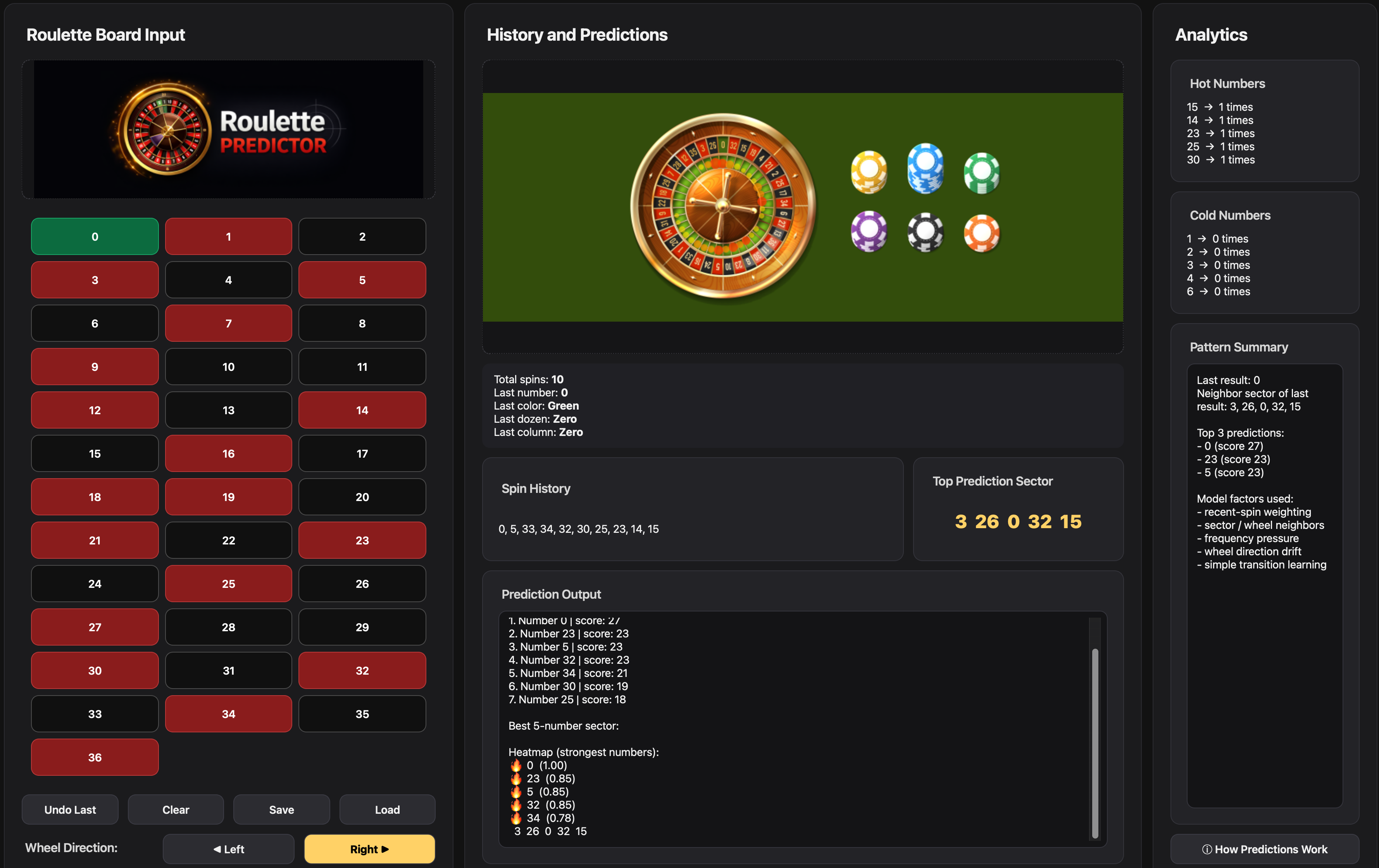
Prediction Interface Preview

A direct look at the working interface, including spin history, table layout, and analytical display.

Roulette Predictor software screenshot Click to enlarge

Spin history tracking, prediction grid, and statistical analysis panel.

Purchase & delivery

1

Purchase a license from the product page.

2

Receive the installer and license key by email.

3

Install the software on your computer.

4

Activate it using your personal license key.

5

Start using Roulette Predictor immediately.

License and activation

Each purchase includes a unique license key that securely unlocks the desktop installer and activates the software.

  • One purchase linked to one unique license
  • Activation key delivered after successful payment
  • Secure access to the desktop installer
  • Simple setup for local installation

Start Using Roulette Predictor Today

Purchase a license and receive instant access to the desktop installer together with your personal activation key.

Disclaimer: This software is intended for analytical and educational purposes only. It does not guarantee gambling outcomes or winnings.